How Access To Program Benefits Works Today
Currently, members of your community must apply at hubspot.com/startups, manually selecting your organization as their partner, to gain access to program benefits.
What's Changing
Powered by our new in-app Partner Dashboard, there are 2 new ways for your community to unlock discounted HubSpot pricing, instantly:
- Startups visit a URL unique to your organization, known as your Partner Referral Link, to apply.
- Startups apply at hubspot.com/startups and enter a code unique to your organization, known as your Partner Referral Code. This is the series of letters and numbers that follow ‘partner-code=’ in your Partner Referral Link.
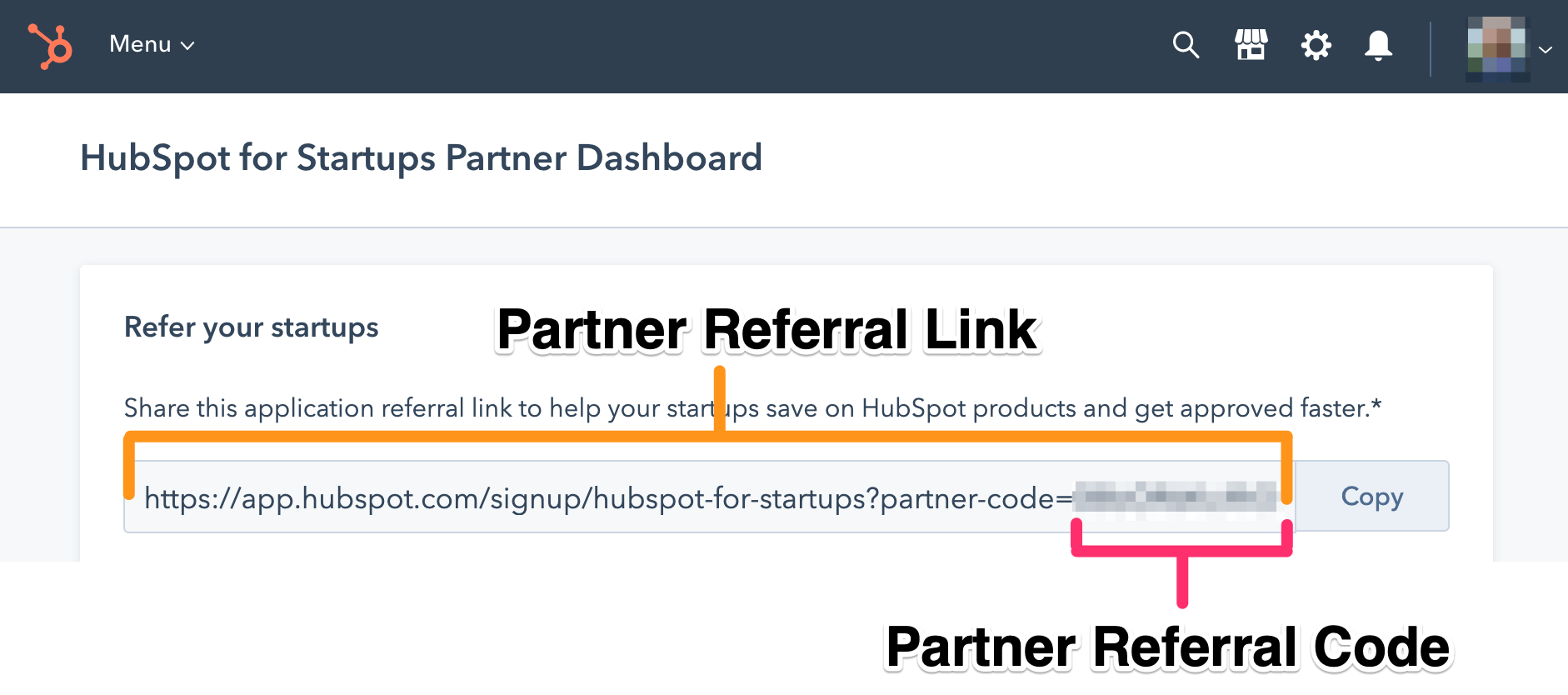
We ask that our partners share the link and/or code provided by HubSpot via the Partner Dashboard with their active members in good standing only and that the link or code be shared in a secure way, with access that is restricted to the member base. As a partner, please ask your members to not share the link or code with anyone, keep the link and/or code confidential and use it exclusively for their own business. If you become aware of an access breach, unauthorized distribution, or any other misuse of the link or code notify HubSpot immediately. We will send you new link or code. Continuous unauthorized distribution of the links or codes may lead to termination of this functionality for your organization.
How To Activate Your Partner Dashboard
To activate your Partner Dashboard and generate your unique partner link and code, your organization’s primary point of contact must re-submit the HubSpot for Startups partner application (takes 2 minutes!).
While activating your dashboard, please be aware:
- If your dashboard is already activated, you will be able to access it here.
- During the application process, you may be prompted to select your organization’s approved HubSpot portal or generate a new one. Once selected/created, please complete all steps in the application to ensure your Partner Dashboard and unique partner link are created.
- Re-submitting the partner application automatically confirms your status as an approved partner.
- If you created a new portal, you will need to add your team.
- To view your new Partner Dashboard, log in to your HubSpot portal and click the orange sprocket in the top left corner. Note: It can take up to two hours for your portal home to be set to your new Partner Dashboard. You may also set your default home page manually here.
Why It Matters
Later this year, once our partners have activated their dashboards and partner referral links, startups who apply without a partner referral link/code will be denied access. Looking for an easy way to share this change with your community today? View our updated recommended communications here.

.png?width=644&height=644&name=HS_Pictograms_Closing%20Deals_500px%20(2).png)