


<link rel="stylesheet" href="https://53.fs1.hubspotusercontent-na1.net/hubfs/53/hub_generated/template_assets/1/202012046126/1765905896155/template_footer-core-non-critical.min.css">

Free Guide

The AI Toolkit I Use Every Week: ChatGPT vs. Claude vs. Gemini vs. Perplexity (with My Exact Prompts)

Find out YouTube Creator Grace Leung's favorite use cases for each popular AI tool, and her favorite prompts for ChatGPT, Claude, Gemini, and Perplexity.

Explore HubSpot's AI-Powered CRM, designed to turn creative AI ideas into automated workflows across marketing, sales, and service.

Are you paying for ChatGPT, Claude, and Gemini, but still wasting hours switching between them, never sure which one to use?

Or worse, are you sticking to one tool for everything, missing the features that could actually save you time?

I'm Grace Leung, and I've spent two years testing every major AI tool to figure out exactly when to use what. As a digital growth consultant and YouTube creator, these workflows power everything: from client work to content production to running my growth community.

In this guide, I’ll share more about what I’ve learned, what use cases I use for different tools, and some actionable prompts you can try out today.


HS_Pictograms_CultureCode_Solve for the Customer_500px-1


ChatGPT:
All-purpose productivity and agent-based automation. Perfect for brainstorming, coding reviews, and setting up recurring research tasks with generous usage limits. 

HS_Pictograms_Strategy_500px-300x300-a4acd96


Gemini:
Large-scale document analysis and Google Workspace integration. Excels at multimodal content (video/image analysis) and creating visual dashboards with its massive 2M token context window.

HS_Pictograms_Fair_800px


Claude:
Strategic thinking and voice-matched content creation. Unmatched for maintaining your unique tone, building specialized workflows, and serving as a thought partner for complex decisions. 

HS_Pictograms_Website_Traffic_500px


Perplexity:
Real-time research with verified sources. The go-to for fact-checking, trend monitoring, and gathering current information with citations you can trust.

A digital growth consultant and YouTube creator (100K+ subscribers), whose spent the last two years testing every major AI tool to power everything from client work to content production to running her growth community.

Who is Grace Leung?

Section 1

Why ChatGPT? Plus Example Prompts

ChatGPT's generous usage limits make it ideal for quick, varied tasks throughout the day, I never worry about hitting capacity. It’s not necessarily the “best” at everything, but it acts like a workhorse that can just keep going. 

ChatGPT's Agent Mode is why I keep coming back. It can browse sites, execute searches, and complete multi-step tasks autonomously—something other AI tools don't offer yet. I schedule ChatGPT to run recurring research tasks—marketing research, weekly industry updates—so the work happens in the background.


Use Cases:

This is the killer feature. Agent mode actually browses websites, reads through comments, and compiles real data. I use it for everything from content research to digging through Reddit threads to understand what my audience actually struggles with.

When I need a second opinion on headlines, hooks, or creative angles, ChatGPT is my brainstorming partner. It's fast, doesn't judge my terrible first drafts, and the generous limits mean I can iterate 20 times without worry.

Look, I'm not a developer. But, I need to tweak landing pages, fix tracking codes, and build simple automations. ChatGPT is surprisingly capable for these tasks, and its generous limits let me debug iteratively without worrying about usage caps. I can actually debug properly instead of rushing through.

I have ChatGPT running recurring tasks that save me hours. Every week, it gathers AI news, competitor updates, and industry trends — all automated. 

Example Prompts

Turn on ChatGPT agent mode. Then, ask it to do content research by really doing the actual search action. Browsing is not possible in deep research mode. Agent functionality makes all the difference. 

Prompt example: 

I want to launch a YouTube channel about productivity. Research the landscape and create a content strategy.

Follow the steps below:

1. Search YouTube for productivity, anti-procrastination, and time management content. Find 6-8 top channels that: 

- Uploaded consistently in the last 3 months
- Get strong engagement AND solid view counts (both raw views and views relative to subscriber count)

For each channel, analyze:
- Content approach and format (tutorials, vlogs, reviews, etc.)
- Most popular video topics from the last 6 months
- Thumbnail and title strategies that get the highest views
- Upload frequency and timing patterns 

2. Navigate to the 2-3 highest-performing videos from each top channel. Read through the comment sections and identify:
- Recurring audience pain points and frustrations
- Content requests that aren't being fulfilled
- Common questions across multiple videos
- How viewers describe their problems (their exact language)

3. Based on your research, identify:
- High-demand topics existing channels aren't covering adequately 

- Content gaps where audience requests aren't fulfilled

- Unique angles based on actual viewer language and pain points

Output as a comprehensive report that includes:

  • Summary of key opportunities 
  • Detailed research findings with actionable insights 
  • Content strategy with specific video ideas and rationale

Reddit is a treasure trove of useful information. You can see real user questions, pain points, and challenges about certain topics. This prompt can help you understand what users need, then compile a comprehensive report. 

Prompt example: 

I am doing audience research about AI search optimization to understand my potential audience's needs and challenges. The goal is to inform my strategy better.

Help to do a Google search using the search query below to dig through a list of Reddit thread questions from this specific SEO subreddit. When you search this query on Google, you should see all the questions listed on the search results page. These are the questions asked by users. Get at least 50 questions. Filter the search results to the past month. Only find the search results in the past month.

Based on these questions, extract the recurring themes that you have noticed that convey insights about the users' pain points, motivations, and desires. 

The query: 

site:https://www.reddit.com/r/SEO/ (how OR what OR when OR where OR who OR which OR is) Output them as a CSV file. 

IMPORTANT: only use this source; do not search from elsewhere. The question must start with “HOW”, “WHAT”, “WHEN”, “WHERE”, “WHO”, “WHICH”, “WHY”.

Output as a comprehensive report. 

ChatGPT’s Agent Mode can analyze top-ranked search results. It can then identify keyword opportunities and how competitors cover the topic. The best part? The same method can be applied to AI search. 

Prompt example: 

Research on the 3 trending topics about “AI Marketing” from the past 30 days. For each of them, search the keyword on Google Search, and analyze the top 10 search results. For each result, visit the page and identify:

  1. Content format (blog post, product page, tool, video, etc.)
  2. Main topics/angles covered
  3. Content depth and structure

Summarize your findings in a report covering:

- Dominant content formats in the top 10

- Common topics/themes across results

- Content gaps or opportunities you notice

- Recommendations for content strategy

Format as a Word document with clear sections and bullet points.

Use AI to do an initial, quick audit of any website. That may be a prospect, a client, or a competitor. ChatGPT can tell you how clear the message is, where CTAs are, and how easy the page is to navigate. 

Prompt example:

I am reviewing the user experience for a client site. Help to do a quick UX audit of this website: [paste website URL]

Make sure you dig through each key page for the audit process. 

Audit area:

  1. Message clarity: Homepage clarity, value proposition visibility, visual hierarchy
  2. Navigation and structure: Menu organization, ease of finding key pages, mobile responsiveness
  3. Call-to-actions: Placement, clarity, and effectiveness of primary CTAs
  4. Content quality: Readability, messaging clarity, use of white space
  5. User flow: How easy is it to complete primary actions (sign up, purchase, contact, etc.)
  6. Trust signals: Testimonials, social proof, credentials, etc.

Output as a comprehensive report that covers:

- Overall summary about the initial UX review

- Top 3 critical issues to fix 

- Top 3 quick wins for improvement

- 5-7 specific actionable recommendations with examples

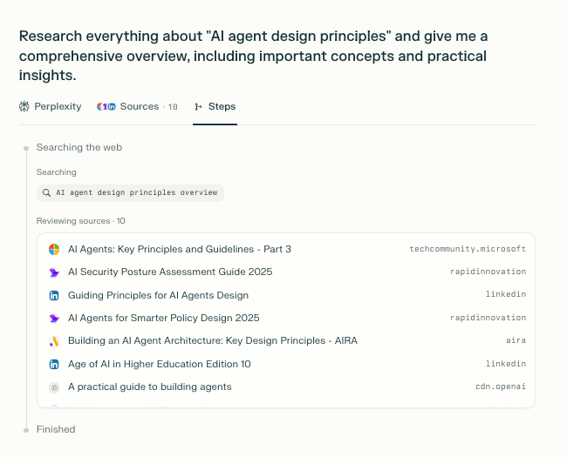
Try this one to do deep research on a topic you’re not familiar with.

Prompt example:

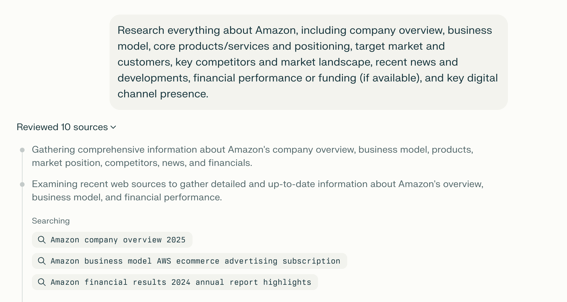
Research "AI browsers" and create a comprehensive report. Cover AI Browsers, current market trends, key players and their approaches, how the technology works, adoption rates and target users, real user feedback from Reddit/Product Hunt/Twitter (both pros and cons), primary use cases where they excel, limitations and criticisms, and future outlook. 

Prioritize recent sources from the last 6-12 months. Include both industry analysis and actual user perspectives with specific examples and data points. Export as a detailed report with an executive summary, key findings for each area, notable user quotes, and sources for further reading.

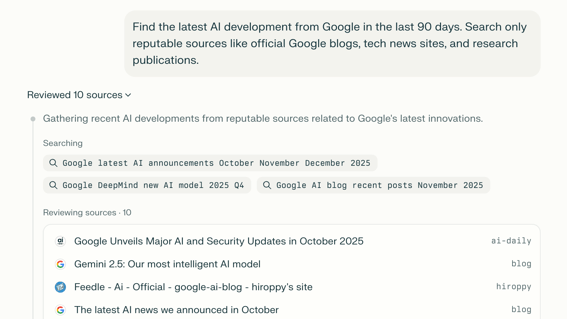
ChatGPT can build you a news digest that’s ready for you monthly, daily, or weekly. Just set a recurring task to let ChatGPT deliver the latest news or trends in topics that you want to keep up with. For myself, it’s always digital marketing, SEO, and AI tech.

Prompt example: 

Search for the latest AI news and developments from the past 7 days. Analyze the key implications for marketers and business leaders. Include how these developments might impact marketing strategies, new opportunities, or challenges they create.

*Schedule to run on a weekly basis

Section 2

Why Gemini? Plus Example Prompts

Okay, let's talk about Gemini, my favorite tool to use when things get BIG. I'm talking about items like 200-page reports, hour-long meeting recordings, or massive datasets that that other tools struggle with.

With its 2-million-token context window (yes, that's over 1,500 pages), Gemini handles it just fine. Even the web version offers 1 million tokens, which is impressive.

What’s most helpful for me is that I already live in Google Workspace. My entire business runs on Docs, Drive, and Gmail. Gemini lets me create GEMs which are specialized AI assistants that integrate directly with Google Drive. Each GEM has its own expertise and access to relevant files.


Use Cases:

Since my files live in Google Drive, Gemini's one-click import is a huge time-saver—no downloading and re-uploading. I can quickly pull in client documents, transcripts, or data files and process them with specialized GEMs I've set up for different tasks.

This integration alone saves me 5+ hours per week of file management.

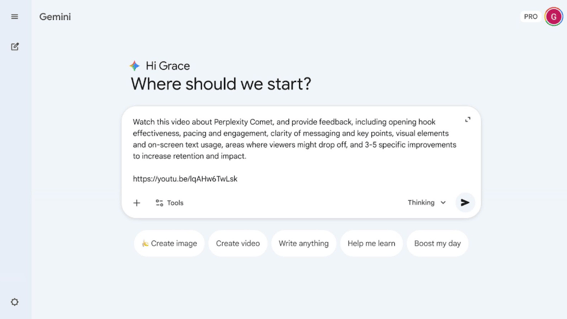
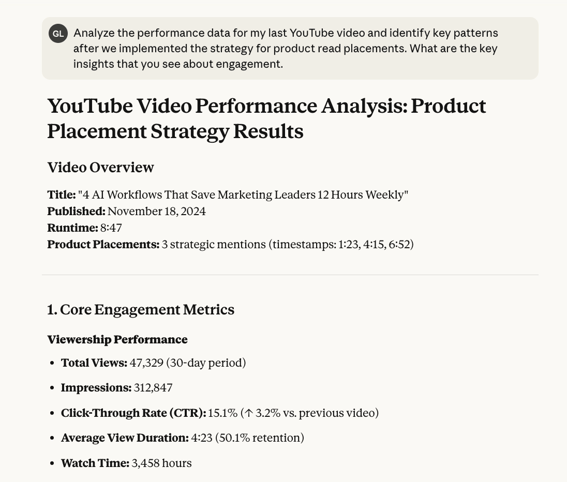
Gemini's integration with YouTube is a game-changer. I use it to review my past videos for learning, identifying weak points, suggesting timestamp chapters, and catching audio quality issues. When I want to learn from other great videos, Gemini can 'watch' any YouTube video and break down their hook strategies, pacing patterns, and engagement techniques.

Canvas mode is my go-to for building data visualizations. Instead of wrestling with Excel, I feed Gemini the data and it creates polished charts, graphs, and process flow diagrams that I can use in client presentations. The output is clean and polished, ready to drop into client decks.

VEO 3 integration means I can generate custom video footage for my YouTube channel. Instead of paying $200/month for stock footage subscriptions, I describe exactly what I need and get it generated. The quality isn't Hollywood, but for B-roll, it’s perfect.

When I'm analyzing market research reports, competitor content audits, or year-end data reviews, Gemini's context window means I can upload everything at once. 

Then I can ask complex questions that span across all documents, something impossible with other tools.

When I need variations — headlines, hooks, email subject lines — Gemini excels at generating multiple creative options that actually feel different. I typically ask for 20 variations and get 20 usable options.

Example Prompts

Gemini Prompt 1

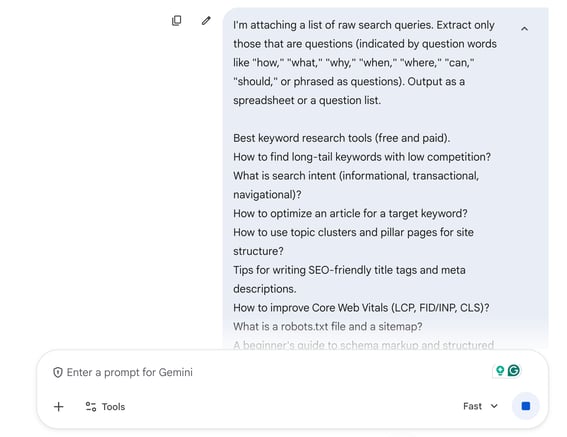
Gemini is my favorite tool for unlocking trends in large datasets. Ask Gemini to analyze the information in raw format and extract insights. It can also enhance the context by making a new column.

Gemini Prompt 2

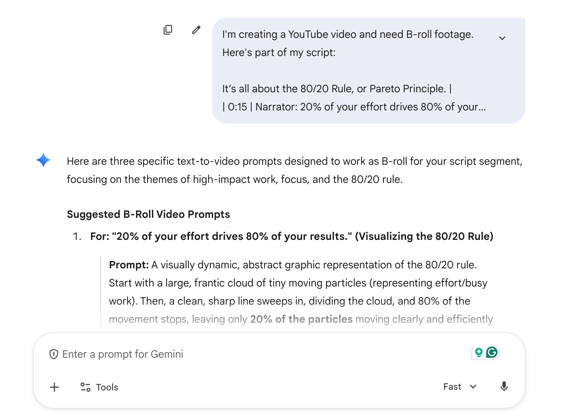
Looking for Gemini B-roll? Instead of thinking of a good video generation prompt, my approach is to usually feed the actual script or narrative to Gemini. Then, I ask it to propose text-to-video ideas. 

Gemini Prompt 3

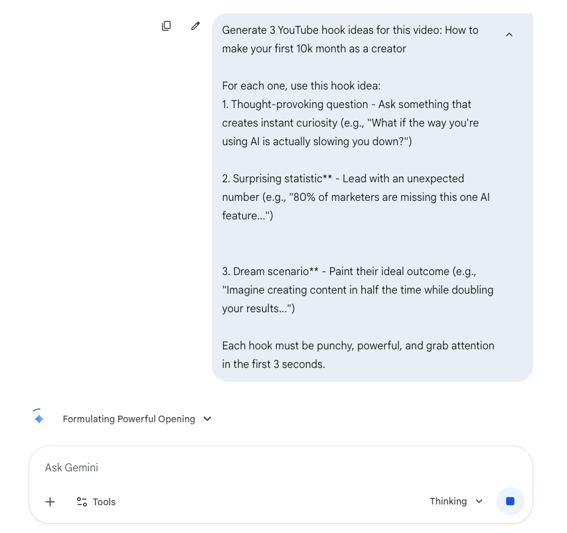
Gemini helps me ideate intros so I can grab my audience’s attention. Use this prompt to ask Gemini to propose ideas for the hook that can be used in your video (or any social media content).

how to analyze video content with gemini

I use Gemini as my last stop before posting. Why? It can catch audio glitches and confusing spots in your script. Ask Gemini to analyze your own video content and provide useful feedback as a creator. 

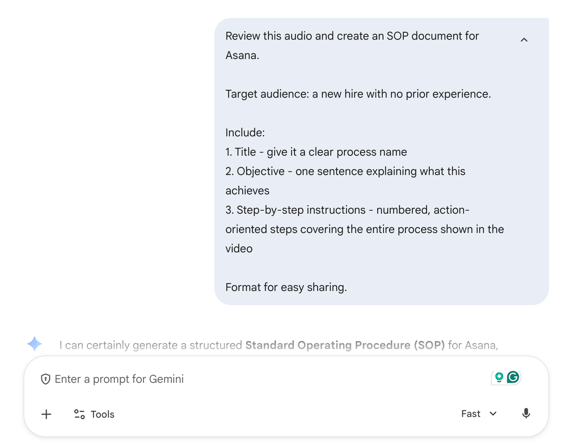
Gemini Prompt 5

Gemini can also transform your tutorial into documentation. Ask Gemini to analyze the recording and extract the key process. This is helpful if you want to quickly share a process with a client or for your own records. 

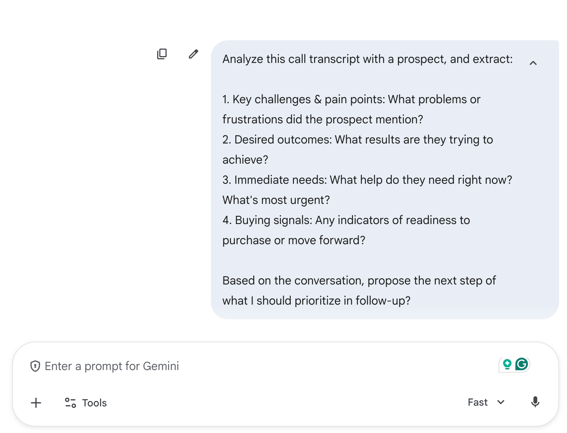
Gemini Prompt 6

I’ve found that game-changing ideas can be found in client calls. Gemini helps me make sure that information isn’t lost. Use this prompt to import any call transcript and ask Gemini to extract useful insights. 

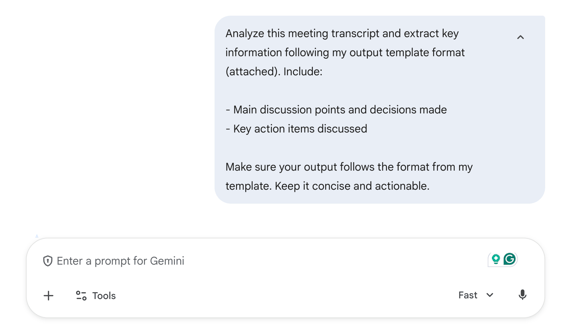
Gemini Prompt 7

Gemini can be your meeting notetaker, so you can be present during meetings. Import an hour-long meeting call. Then, ask Gemini to extract key discussion points and action items that can be shared with clients. 

Section 3

Why Claude? Plus Example Prompts

Remote_Worker_Linear_llustrations_Characters

I use Claude more than any other AI models.

90% of my workflows are built on Claude.Yes, the usage limits are annoying, especially those weekly caps that make you ration every message. 

But, its Project feature, tool calling via MCP, and the new Claude Skills let me build powerful, specialized workflows all inside Claude. I have projects set up for content creation, client strategy, data analysis—each with its own context, instructions, and tool connections. While other AIs are still figuring out basic connectors, Claude can orchestrate complex workflows between multiple tools seamlessly.

Claude is also unmatched at understanding nuance and maintaining context. It can actually follow complex instructions without forgetting details halfway through.

Another standout feature is its voice matching. When you give Claude detailed samples of your writing, it nails your tone better than any other AI. I've tested this extensively. That consistency is crucial for brand voice.

Claude excels at multi-variable problem-solving. When I'm weighing options (like whether to launch a new offer or double down on existing services), it considers all the factors I've mentioned. Factoring in time constraints, revenue goals, and audience size, it gives genuinely thoughtful analysis. 

After feeding Claude with many writing samples across different content types, Claude can produce content that matches my style — not just tone, but also sentence structure, vocabulary choices, and pacing. The setup is worth it for consistent output across platforms.

The MCP support, combined with Claude Projects, means I can build reusable workflows that would normally require 3rd party tools. I have workflows that pull analytics data, generate reports, create visualizations, and format everything for clients, all in one conversation thread.

Artifacts feature lets me create dynamic dashboards and interactive reports. Instead of static PDFs, clients get explorable data stories. The quality is professional enough that several clients have asked what design team I use.

What sets Claude apart is how it handles ongoing projects. As files, conversations, and context pile up, Claude still remembers the details. Other AIs start forgetting or contradicting themselves as projects grow—Claude stays consistent. This matters for client work that spans weeks, not hours.

Claude Example Prompts

Claude Prompt 1

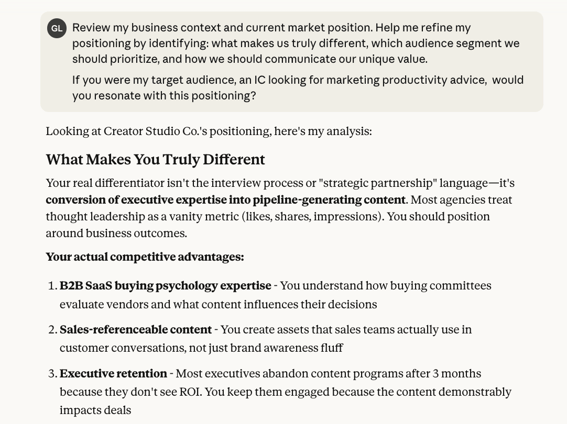
Prepare all important context for Claude, and then use it as a thinking partner. Claude can challenge your assumptions, help you understand your place in the market, and think through a choice strategically. Here are some prompts to get you started. 

Claude Prompt 2

AI excels at pattern recognition. I often feed Claude successful content—videos, newsletters, landing pages, ad copy—and ask it to identify what's working to inspire my own thinking. It breaks down structure, hooks, and engagement patterns so I can apply those principles or develop more new ideas to my own work.

Claude Prompt 3

Claude can help teams turn data into insight. Just ask Claude to create a compelling story by analyzing data or strategy. From there, AI can create data visualizations that make strategy tangible.

Claude Prompt 4

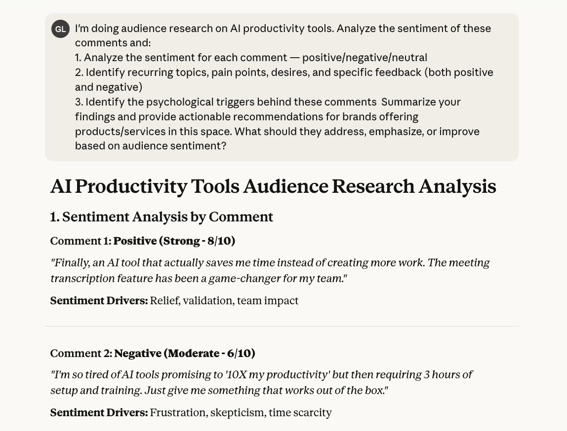
Claude can help teams understand how their audience feels about a campaign, product, or service. Start by scraping a list of real audience reviews or comments about a brand, product, or service offering. Then, Claude can analyze them. 

Claude Prompt 5

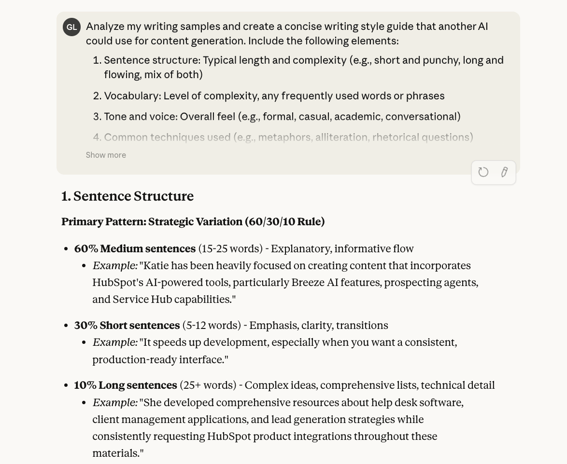
Looking to make your writing consistent? Claude can analyze completed newsletters, LinkedIn posts, or website articles. From there, it can identify throughlines and build you a complete style guide.

Claude Prompt 6

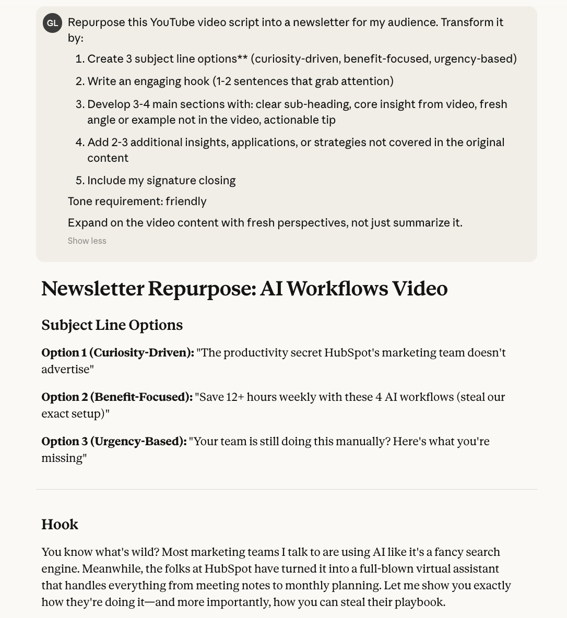
One YouTube script can be repurposed into a newsletter, blog post, and social media campaign. AI can help you turn one great idea into a multi-channel experience. Try this prompt to repurpose a YouTube script into a newsletter.

Section 4

Why Perplexity? Plus Example Prompts

Creative Thinking_Linear_llustrations_Environmental

Perplexity does one thing better than any other AI: real-time search with citations. When I need current information — what happened yesterday, latest statistics, recent updates — Perplexity delivers with actual source links. 

The search capability is exceptional. It's faster than manual Googling and more reliable than asking other AIs about current events. Other models might give you outdated information or make things up. I often found Perplexity’s research results to be more accurate than other AI search engines. 

The different research modes add flexibility. Standard search for quick queries, Deep Research for comprehensive analysis, and Perplexity Labs when you need to combine research with building. 

Pro mode lets you switch between Claude, GPT, and other models. However, the default model is more than sufficient for research. I rarely need to switch Use Cases.

For staying on top of AI developments, algorithm updates, or industry news, Perplexity pulls from the most recent sources. It timestamps everything and prioritizes new information over old, which is critical for fast-moving topics.

Before publishing any statistic or claim, I run it through Perplexity. It tells me the original source, when it was published, and whether there are conflicting reports. This prevents me from citing outdated or incorrect information.

When I need to quickly understand a new subject, Perplexity curates quality sources instead of just showing top search results. It pulls from academic papers, industry reports, and expert analyses. That comprehensive view saves me hours of research time.

Sometimes, research needs to go beyond the latest news. You have to dive deep into how people feel. Perplexity finds real discussions from Reddit, forums, and social platforms. This gives me actual user sentiment rather than marketing materials or potentially fake reviews.

Some AI products thrive on desktop only. But, I’ve found Perplexity thrives on the go. The mobile app is excellent for research on the go. I can fact-check during meetings, find quick statistics for presentations, or research topics between appointments.

Perplexity Example Prompts

Perplexity Prompt 1

Perplexity is a powerful search tool, so I wanted to start with a help prompt that can kick your research into high gear. Here’s how you can use Perplexity to quickly learn a new subject.

Preplexity Prompt 2

I’ve found Perplexity research to be a real unlock when scaling my business. I’ve used it to do initial research on partners, so I can see who’s a natural fit for my creator business. Sales teams and business owners can also use Perplexity to research a prospect’s company.

Perplexity Prompt 3

Businesses need to stay up-to-date with both the market and how users perceive their offerings. Perplexity can help. With the prompt below, I can see what tools are on the market, their capabilities, and how users feel about them. 

Perplexity Prompt 4

Try this prompt in Perplexity to find the latest industry research and stay ahead of what's happening in your space. This approach helps you cut through the noise by filtering for credible sources, ensuring you're building a strategy on solid ground rather than speculation.

Perplexity Prompt 5

If you want to learn about pretty much any topic, start with a prompt like this. Perplexity can curate a learning path tailored to your needs, pulling together diverse formats so you can learn in whatever way works best for you — whether that's listening, reading, or watching.

Perplexity Prompt 6

AI can help make fact-checking easy. Just upload a chart or graph, and Perplexity can verify if the data is still accurate by searching the latest reports from reputable sources. This is especially useful when working with older presentations or inherited materials.

My 3-Question Framework: Choosing The Right Tool

Before prompting any AI, I ask myself these three questions, so I can pick the right AI tool for the task.

Available

  • Do I need real-time or current information? If yes, I pick Perplexity.
  • Does this require strategic thinking, nuanced writing, or complex workflows requiring external tool connections? If yes, I go with Claude.
  • Is this a general task, exploration, or do I need AI to autonomously browse the web, navigate sites, or execute tasks? If yes, I opt for ChatGPT or Gemini. If the project involves working with Google tools or large files, Gemini is my top pick.
what tool isn't good for

What Each Tool Isn't Good For

Understanding limitations is just as important as knowing strengths. Here is where tools struggle, so you know when to proceed with caution. 

  • ChatGPT: Avoid ChatGPT for real-time information needs. It will confidently make up outdated statistics. ChatGPT is also weaker for high-accuracy data analysis compared to other models.
  • Gemini: While excellent for prototyping, it's inconsistent with detailed coding. There’s limited integration support outside Google's ecosystem, which makes it less ideal for complex third-party workflows.
  • Claude: The strict usage limits (especially weekly caps) make it unsuitable for high-volume tasks. I pre-process large datasets with other tools before bringing refined questions to Claude.
  • Perplexity: It's laser-focused on search, but don't expect it to handle general productivity tasks, creative work, or workflow automation. Even when switching between models, they're all optimized for search-based responses.
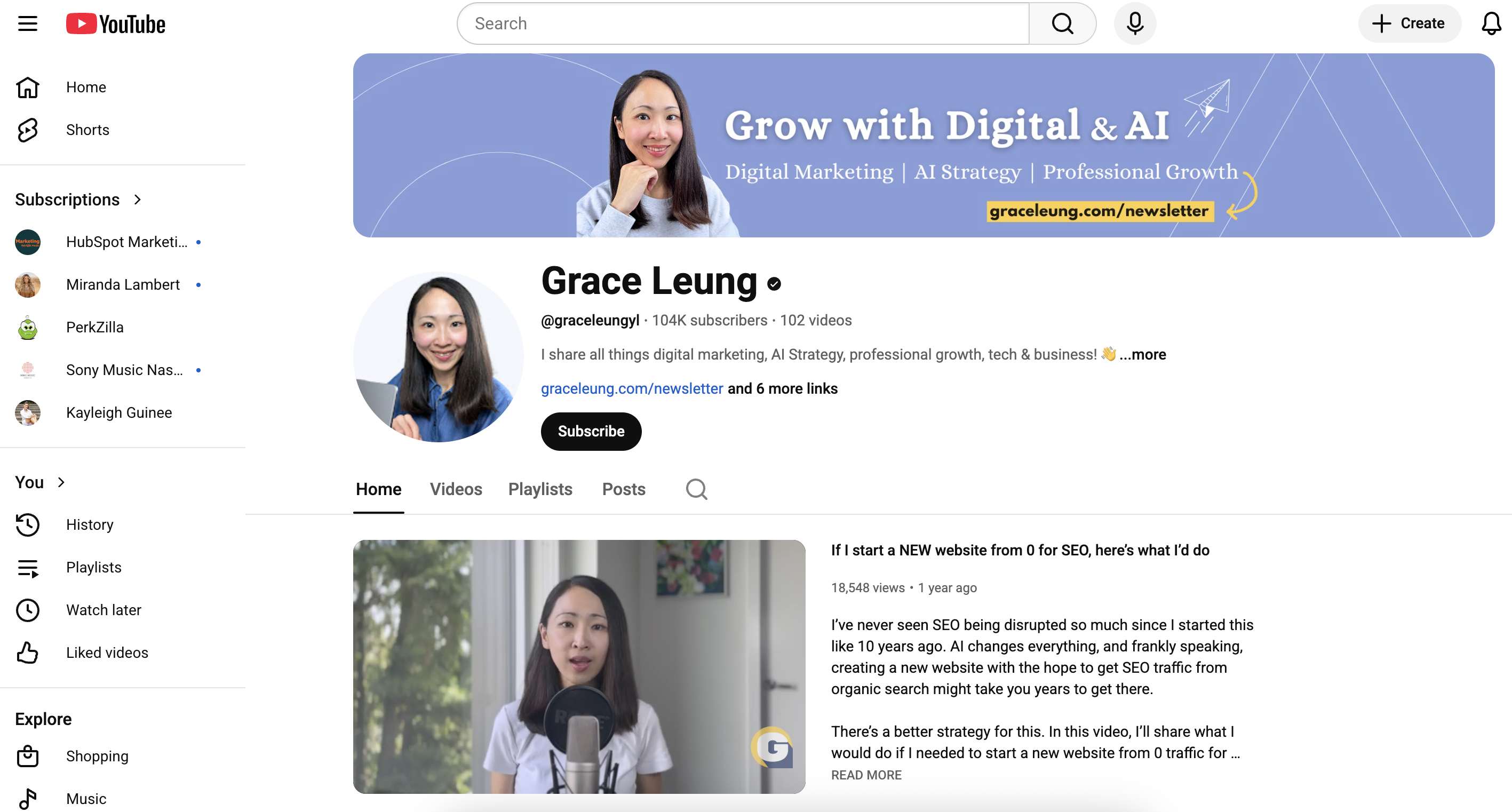
Grace Leung's YouTube

Your Next Step

These AI workflows helped me scale from solo consultant to running a sustainable business with multiple income streams. They're tested systems I use every single day.

If you want help turning these workflows into a repeatable growth system, join my Growth Community. Inside, you’ll get monthly live workshops, AMAs where you can bring your own business questions, and access to my AI prompt and resource library that is ready to use. 

If you prefer to learn through step-by-step demos, subscribe to my YouTube channel. I publish deep dives on ChatGPT, Claude, Gemini, and Perplexity. I also share real marketing workflows and breakdowns of how I use these tools to run a 6-figure business. Every video is designed to give you at least one workflow you can plug straight into your own work.

Breeze – Meeting Insights_2x

HubSpot’s Breeze: AI That Works Where You Do

AI tools built into HubSpot to help you work faster, save time, and focus on what matters most. From writing to reporting, Breeze helps you move quicker and get more done.